
Shark Steam Mop Lights Flashing: What Each Light Means

Disclosure: FloorsMop is reader-supported. As an Amazon Associate, we earn from qualifying purchases. If you buy through a link on this page, we may earn a small commission at no extra cost to you. Learn more.
Quick answer: On most Shark steam mops, a flashing blue light means the mop is in standby mode, not that something is broken. Press the steam control button to choose a steam setting and the light should turn solid. If it keeps blinking, fill the water tank, change a soaked pad, and unplug the mop for a few minutes to reset it.
Shark uses slightly different light patterns on different models, so read this alongside your owner’s manual. If the light looks normal but you still get no steam, our guide to why a Shark steam mop is not steaming walks through the rest of the fixes.
Start Here: Fast Checks
| What you see | What it usually means | What to do | Time |
|---|---|---|---|
| Blue light blinking after plugging in | Standby mode | Press the steam button to pick a level | Instant |
| Light blinks and won’t change | Empty tank or soaked pad | Fill the tank, change the pad | 2 min |
| Solid light, no steam yet | Still heating | Wait 30 to 60 seconds | 1 min |
| Lights under the button blinking | Waiting for a setting | Press the button to choose low, medium or high | Instant |
| No light at all | No power | Try another outlet, check the cord and breaker | 5 min |
| Light on, but steam is weak | Scale or low water | Refill and clear the steam holes | 10 min |
What Each Shark Steam Mop Light Means
Flashing blue light: standby mode
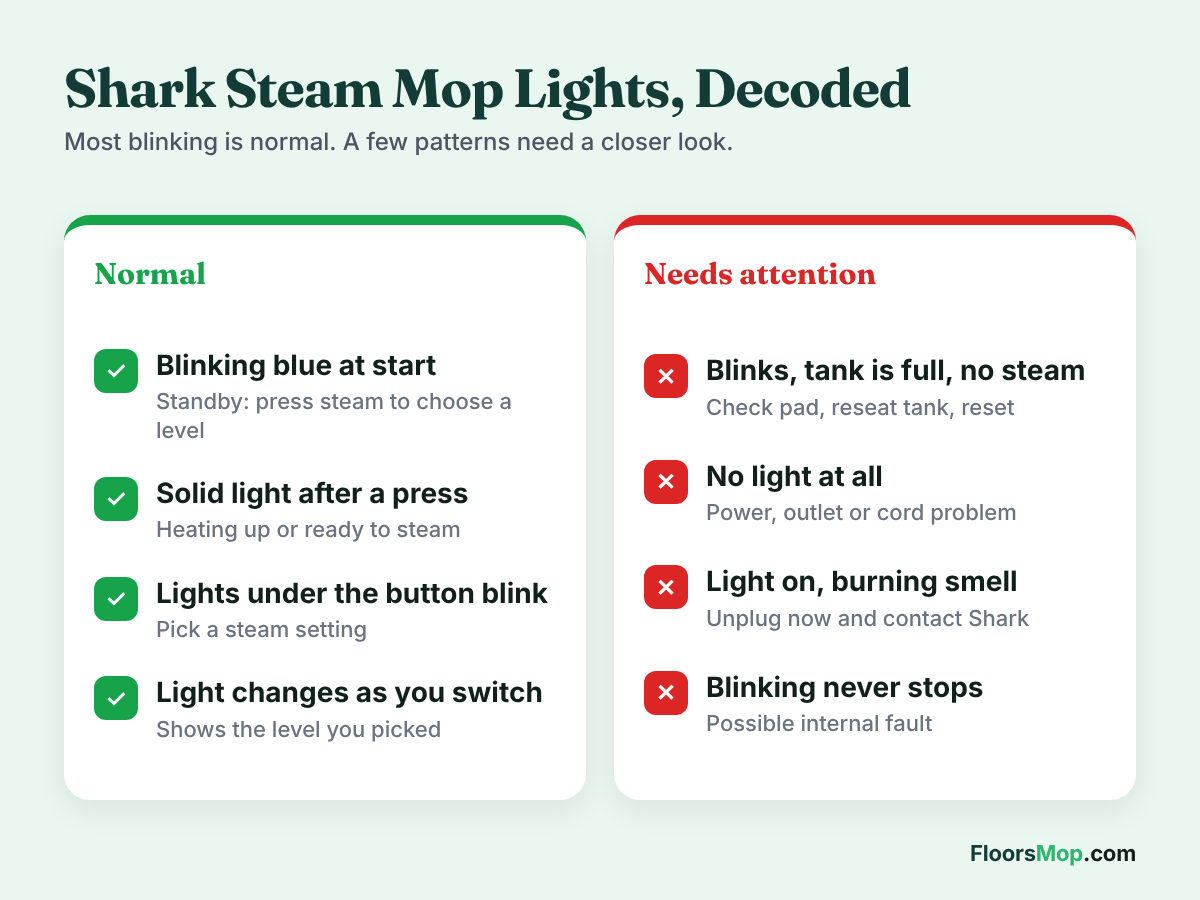
On many Shark steam mops, the steam control button flashes blue to show that the mop is in standby. It has power, but you have not selected a steam level yet. Shark’s troubleshooting guides list “flashing blue light remains on” as a problem with a simple fix: add water to the tank and press the On/Standby button to choose a steam setting.
Solid light: heating or ready
After you press the button, the light usually turns solid. On some models a solid light means the mop is heating, and you should give it about 30 seconds before steam comes out. On others it means the mop is ready. Either way, a solid light is normal.
Blinking lights under the steam button
Models with more than one steam level often have a row of small lights under the button. If these blink, the mop is asking you to pick a level. Press the button to cycle through low, medium and high. On several Steam Pocket and Steam & Scrub models the levels are labeled Dust, Mop and Scrub.
No light at all
If nothing lights up, the mop is not getting power. This is a power or cord problem, not a light problem. See reason 5 below for the power checks.
Patterns not listed here
Some newer models may use other colors or blink codes. If you see a red light or a pattern you can’t match, look it up in your manual or on Shark’s support site using the model number on the back label. Don’t guess, because some patterns point to overheating.
6 Reasons the Light Keeps Flashing (and How to Fix Each)
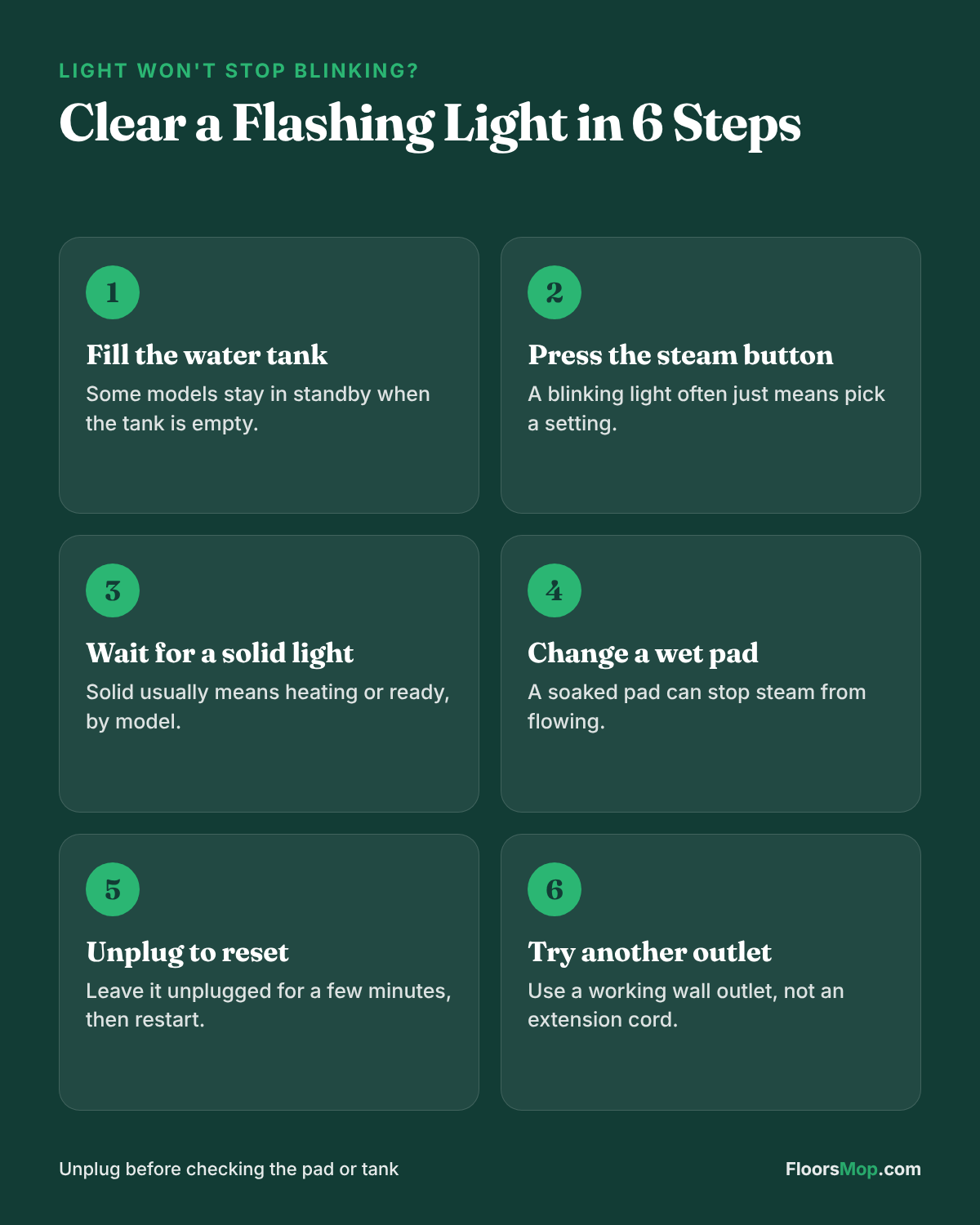
1. You have not picked a steam setting
This is the cause most of the time. The mop powers on into standby and waits for you.
Fix: Press the steam control button once. Watch the light change from blinking to solid, then wait for steam.
2. The water tank is empty or not seated
Several Shark manuals pair the blinking light with an empty tank. If the tank is missing water or not clicked in, the mop may stay in standby.
Fix: Unplug, remove the tank, fill it to the MAX line, and push it back in firmly. Then plug in and press the button again.
3. The pad is soaked
Shark’s troubleshooting tables also mention checking if the cleaning pad is too wet. A saturated pad can block the steam path.
Fix: Unplug the mop and attach a clean, dry pad. Change pads every room or two on big jobs.
4. The mop needs a reset
Like many appliances, a steam mop can get stuck in a mode. Shark’s own guidance notes that unplugging and using a different outlet can reset standby.
Fix: Unplug the mop for five minutes. Plug it into a different wall outlet and try again.
5. Power is weak or interrupted
Loose plugs, worn outlets and extension cords can cause the mop to cut in and out, which can look like blinking.
Fix: Plug directly into a wall outlet. Check that the plug fits snugly. Inspect the cord for damage.
6. An internal part has failed
If the tank is full, the pad is dry, you have reset the mop, and the light still blinks with no steam, the heater, pump or control board may have failed.
Fix: Stop using the mop and contact Shark support. Don’t open the housing, because that can void your warranty.
Notes by Model
| Model family | Light behavior to know |
|---|---|
| Steam Pocket (S3501, S3601) | Blue standby light; three steam levels on most units |
| Lift-Away (S3973 family) | The handheld steamer must be locked in for the mop to work normally |
| Steam & Scrub (S7001, S8201) | Several steam levels; check that both pads are fitted |
| Steam Pickup (SD200, SD201) | Has extra pickup functions, so check the dirty-water parts too |
Read more in our Shark S7001 review, Shark Steam & Scrub S8001 review and Shark Professional Steam Pocket S3601 review.
How to Prevent Light Problems
- Fill the tank before you plug the mop in.
- Press the steam button once after plugging in, every time.
- Keep a spare dry pad nearby.
- Plug straight into a wall outlet.
- Use distilled water to keep the steam path clear.
Warranty, Support and Replacement
Contact Shark if the light keeps flashing after every fix above, if you smell burning, or if the mop shuts off on its own. Have your model number and proof of purchase ready. Shark’s warranty length depends on the model and where you bought it.
If the mop is out of warranty and has an internal fault, compare the repair cost with a new mop. Our guide to the best steam mops lists current picks, and why a steam mop stops steaming covers problems that apply to every brand.
Replacement Parts and Alternatives
- Pads: keep spare Shark Steam Pocket replacement pads on hand.
- Steam & Scrub pads: for rotating models, use Shark Steam & Scrub pads.
- Replacement mop: current Shark steam mops or the Bissell PowerFresh are easy to find on Amazon.
FAQs
Why is my Shark steam mop flashing blue?
It is in standby. Press the steam control button to pick a steam level and the light should go solid. If it keeps flashing, fill the tank and change the pad.
How do I reset my Shark steam mop?
Unplug it for about five minutes, then plug it into a different wall outlet and press the steam button. This clears most stuck standby modes.
Why does my Shark steam mop light come on but no steam?
The mop may still be heating, the tank may be empty or not seated, or scale may be blocking the steam holes. Wait a minute, refill, and clean the holes if needed.
What does a solid light mean on a Shark steam mop?
On most models it means the mop is heating or ready to steam, depending on the model. It is normal.
Can I mop while the light is blinking?
Usually not. A blinking light means the mop is waiting in standby and will not make steam. Press the steam button, wait for the light to go solid, then start mopping.