
Bissell Steam Mop Not Steaming? 9 Fixes That Work

Disclosure: FloorsMop is reader-supported. As an Amazon Associate, we earn from qualifying purchases. If you buy through a link on this page, we may earn a small commission at no extra cost to you. Learn more.
Quick answer: A Bissell steam mop that won’t steam usually has one of three problems: the water tank is low or not seated, the mop hasn’t finished heating up, or hard-water scale has clogged the steam holes. Refill the tank, push it in until it clicks, wait for the ready light, then clear the nozzle if steam still won’t come out.
The good news is that most of these fixes take less than five minutes and need no tools. This guide is for Bissell models like the PowerFresh, PowerFresh Slim, PowerFresh Lift-Off and Symphony. If you own a different brand, our general guide on why a steam mop stops steaming covers the same problems across all brands.
Quick Fix Checklist (Try These First)
| Symptom | Likely cause | Fix | Time |
|---|---|---|---|
| Light is on, no steam at all | Empty tank or tank not seated | Refill and reseat until it clicks | 1 min |
| Steam for a few seconds, then stops | Tank valve sticking or low water | Refill, reseat, and check the valve | 2 min |
| No steam right after plugging in | Still heating up | Wait for the ready light | 1 min |
| Weak, spitting steam | Scale in the nozzle or lines | Clean the steam holes | 10 min |
| Water leaks but no steam | Boiler not hot or pad soaked | Wait for heat-up, swap pad | 5 min |
| No lights, no steam | Power problem | Try another outlet, check cord | 5 min |

9 Reasons Your Bissell Steam Mop Isn’t Steaming (and How to Fix Each)
1. The water tank is empty or below the fill line
It sounds too simple, but a low tank is the cause in a large share of no-steam cases. The pump needs enough water above the outlet valve to pull from. If the level sits near the bottom, you get a few puffs and then nothing.
Fix: Unplug the mop, remove the tank, and fill it with cool water to the MAX line. Don’t use hot water, because that does not speed up heating and can stress the seal. Reattach the tank and plug the mop back in.
2. The tank is not clicked into place
Bissell tanks have a spring valve at the bottom. The valve only opens when the tank is pressed fully onto its seat. A tank that looks attached but sits a few millimeters high will block the water.
Fix: Take the tank off and look at the valve. If you see dirt or hair around it, rinse it under the tap. Then press the tank back in firmly until you hear or feel a click. If it never clicks, the latch or the tank may be damaged.
3. The mop has not finished heating up
Bissell says most PowerFresh models are ready in about 30 seconds, but older units or mops used in a cold room can take longer. Steam will not flow until the boiler reaches temperature, and pumping before then only pushes cool water onto the pad.
Fix: Plug in, wait for the ready light to change (or for one full minute), and then start mopping. If the light never changes, skip ahead to the power checks below.
4. The steam setting is too low or turned off
Many Bissell models let you choose low, medium or high steam, and some have a separate boost or trigger. On low, the steam can be so light that it looks like nothing is happening, especially on a cool floor.
Fix: Turn the setting up to high and watch the pad for a minute. If your model has a trigger, hold it down. Check the owner’s manual for your model number (on the label on the back of the mop) to confirm how the controls work.
5. Mineral scale is clogging the steam holes
This is the most common cause on mops that are more than a few months old. Tap water carries calcium and magnesium. When it turns to steam, those minerals stay behind as white crust in the boiler outlet and the small holes on the mop head.
Fix:
- Unplug the mop and let it cool completely.
- Remove the pad and look at the underside of the head.
- Use a straightened paper clip or a pin to gently clear each steam hole. Don’t push it in deep.
- Wipe away the loosened crust with a damp cloth.
- Refill with distilled water and run the mop for a few minutes over an old towel.
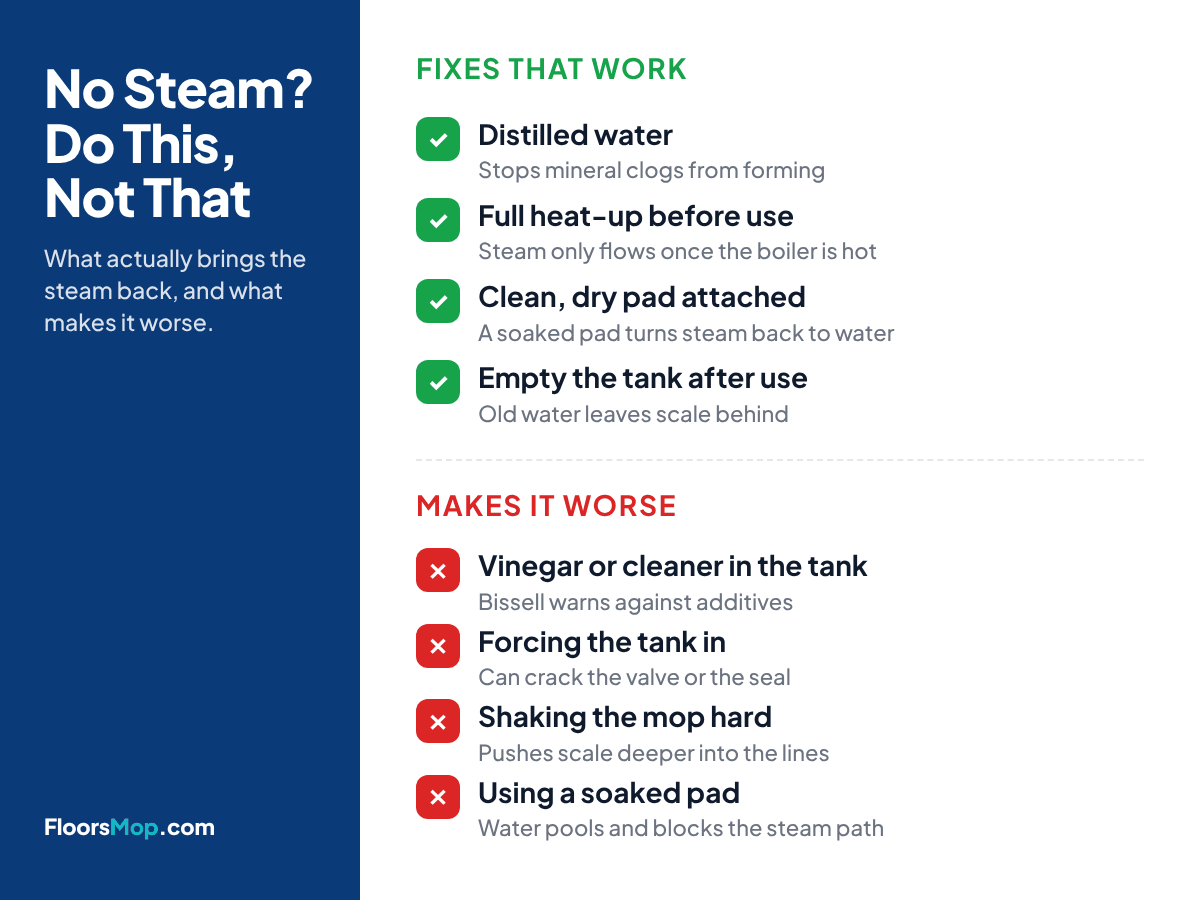
Bissell manuals generally tell owners not to put vinegar, descaler or cleaning solutions in the tank, so don’t treat the inside of the tank or boiler with them unless your own manual says it’s OK. Switching to distilled water is the best way to stop the clog from coming back. Our guide on whether steam mops need distilled water explains why.
6. The pad is soaked or blocking the head
A pad that is already wet from a previous room cools the steam and turns it into water before it reaches the floor. A pad that is put on crooked can also cover the holes unevenly.
Fix: Swap in a clean, dry pad and make sure it sits flat and centered. Change pads every room or two on bigger jobs.
7. The fragrance tray or disc is in the way
PowerFresh models can use scented fragrance discs in a small tray. If the tray is not fully closed, or a disc has dissolved into a sticky paste, it can interfere with steam on some units.
Fix: Remove the tray, rinse out any residue, dry it, and test the mop without a disc. If steam returns, keep using discs sparingly or skip them.
8. Power or outlet problems
If the lights don’t come on at all, the mop is not getting power. Kitchen and bathroom outlets often have GFCI protection that trips without you noticing. Light-duty extension cords can also drop the voltage enough to slow heating.
Fix: Plug the mop straight into a wall outlet you know works. Press the reset button on any GFCI outlet nearby. Look along the cord for kinks, cuts or a scorched plug. Don’t use the mop if the cord is damaged.
9. An internal part has failed
If the tank is full and clicked in, the lights work, the nozzle is clear, and you still get no steam, the pump, heater or thermal fuse may have failed. You may hear the pump hum with no steam, or hear nothing at all.
Fix: This is not a home repair for most people. Opening the housing can void the warranty and exposes parts that get very hot. Move on to the warranty section below.
Notes by Model
| Model family | What to know |
|---|---|
| PowerFresh (1940 series) | Steam level is chosen on the handle. Check it is not set to low before assuming a fault. |
| PowerFresh Slim | Smaller tank, so it runs low faster. Refill more often on large rooms. |
| PowerFresh Lift-Off | The handheld steamer detaches. Make sure it is locked back into the mop body after use. |
| Symphony (vac + steam) | Steam and vacuum share one machine. Check both the water tank and the steam pad attachment. |
| PowerFresh Pet | Same no-steam causes, but pet hair can clog the area around the tank valve. |
If you are not sure which model you have, the number is on the rating label. See our Bissell PowerFresh 1940A review and how to use a Bissell steam mop for setup details.
Prevention Tips
- Use distilled water if your tap water leaves white spots on faucets or kettles.
- Empty the tank after each use instead of leaving water inside for days.
- Let the mop cool fully before you store it, and store it upright.
- Wash pads without fabric softener, which clogs the fibers.
- Clear the steam holes every few months, before the clog gets bad.
When It Needs Bissell Support
Bissell steam mops usually come with a limited warranty that runs one to two years, depending on the model. Check the warranty card or Bissell’s support page with your model number. Contact Bissell support if:
- The mop is still under warranty and no fix above worked.
- You smell burning, see smoke, or the cord or plug feels hot.
- The pump hums loudly but no water moves.
If the mop is out of warranty and the pump or heater has failed, replacing it often makes more sense than repairing it. Compare current options in our guide to the best steam mops, or read how long steam mops last to see if yours is near the end of its life.
Replacement Parts and Alternatives
- Mop pads: a fresh set of Bissell PowerFresh replacement pads fixes many weak-steam and streaking complaints.
- Fragrance discs: if you like scent, use genuine Bissell steam mop fragrance discs rather than oils in the tank.
- Replacement mop: if yours has failed, the Bissell PowerFresh steam mop line is easy to get parts for, and the Shark Steam Pocket Mop is a common alternative.
Own a Shark instead? See why your Shark steam mop is not steaming. And once the steam is back, our guide on how to mop a floor properly helps you get a clean, streak-free finish.
Frequently Asked Questions
Why is my Bissell steam mop leaking water but not steaming?
Water without steam usually means the boiler is not hot yet, or the pad is soaked. Wait for the ready light before mopping and use a dry pad. If it still leaks, the heater may not be working.
Can I put vinegar in my Bissell steam mop?
Bissell generally advises against adding vinegar, descalers or cleaners to the water tank. They can damage seals and void the warranty. Use plain tap water or distilled water. See can you put vinegar in steam mops for more.
How do I unclog my Bissell steam mop?
Unplug it, let it cool, remove the pad, and clear each steam hole with a pin or straightened paper clip. Wipe away the crust, refill with distilled water, and run it over a towel for a few minutes.
Why does my Bissell steam mop stop steaming after a few minutes?
The tank is probably running low, the valve is not fully open, or scale is partly blocking the line. Refill, reseat the tank firmly, and clean the steam holes.
How long does a Bissell steam mop take to heat up?
Bissell lists about 30 seconds for most PowerFresh models. Give it a full minute, especially in a cold room, before you expect steady steam.
Is it worth repairing a Bissell steam mop?
Simple fixes like clearing clogs, new pads or a new tank are worth it. A failed pump or heater out of warranty usually costs close to the price of a new mop.